Imagine cutting your test case creation time by 98% while improving coverage. Might sound like science fiction, but it's the reality of what prompting for testers can achieve. Software testing has changed a lot, thanks to AI tools like ChatGPT. They can generate test cases, create test data, and even help you spot those irritating bugs. Of course, that is, only if you know how to ask them properly. Your QA team’s success increasingly depends on your ability to craft effective prompts. In this article, we will explain the how.
Generic AI prompts produce generic test cases. Testers who master prompt engineering unlock AI's full potential for generating comprehensive, context-aware test scenarios that catch real bugs.
Essential Prompt Engineering Techniques
Provide Context – Include system details, user flows, and business logic for relevant test cases.
Specify Format – Define exact output structure (Gherkin, test steps, acceptance criteria).
Use Examples – Show AI the quality and style of test cases you expect.
Define Constraints – Set boundaries for edge cases, platforms, and test scope.
Iterate Refinement – Start broad, then narrow with follow-up prompts to improve results.
aqua cloud integrates AI-powered test generation with built-in prompt templates optimized for testing workflows. Testers create comprehensive test suites 3x faster with intelligent AI assistance.
Understanding GPT solutions’ Role in Software Testing
AI tools like ChatGPT are robust assistants in modern software testing. They offer support across multiple testing activities, which we’ll cover one by one. You can think of them as a specialised testing partner. A partner with extraordinary knowledge and the ability to generate content on demand.
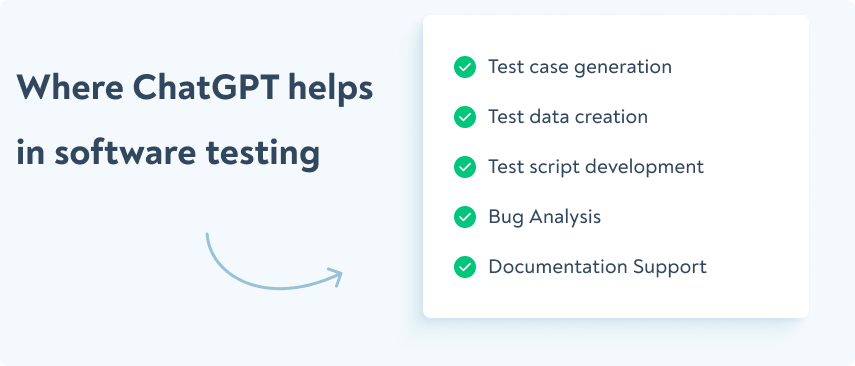
When integrated properly into your testing workflow, ChatGPT helps with:
Test case generation: You can generate large test cases based on requirements. You just need to feed this requirement to the AI and wait for the output.
Test data creation: In your testing efforts, you’ll also need realistic, synthetic test data. AI can produce this test data that sets that match specifications easily.
Test script development: You can also generate and optimise automation scripts with AI. All you need is to describe the test flow, so AI can write readable, optimised code for the testing frameworks.
Bug analysis: You can spot the patterns of issues by feeding defect logs or reports into the AI. The bots will prioritise root causes, detect duplicate bugs, and suggest possible solutions.
Documentation support: You can also speed up test documentation with AI. For this, you need to enable AI to generate formatted summaries, test plans, and reports from your prompt or test results.
I’m using AI for documenting code. Creating small pieces of code, enchanting defect report. Getting edge cases of new features. It is quite time saving.
However, remember tha feeding AI a bare requirement won’t cut it. You need the full context: user stories, acceptance criteria, and edge cases.
Compare these two prompts.
First: “test login functionality.”
Second: “Generate test cases for a mobile banking app login where users must authenticate within 30 seconds or get locked out for 15 minutes. Include scenarios for network drops and biometric failures.”
The second prompt delivers nearly triple the test coverage.
For DevOps and Agile teams, these solutions provide particularly valuable advantages. These environments obviously have rapid iteration cycles. Requirements evolve all the time, and you can enhance them by quick test case generation and updates. Instead of updating test cases manually for days after each sprint planning meeting, you can instruct AI solutions to generate new test scenarios within minutes.
Take this scenario: A development team implements a new feature on an e-commerce site to store credit cards. Instead of taking hours coming up with test scenarios, an instant starting point of test cases like “Create detailed test cases for a new credit card storage feature, including security checks, expiration date management, and masking display” saves time to develop.
Test teams are changing their workflow by letting AI handle documentation grunt work while they focus on strategic planning and hands-on exploration.
Assign AI your repetitive test case writing. Your team’s energy will shift toward high-value activities. Many teams report nearly doubled strategic planning time when they make this change.
Here’s how to capture this shift in your workflow:
Have AI draft your basic regression test cases this week
Review and refine the output (human oversight remains essential)
Track how much mental bandwidth this frees up
Redirect that time to creative testing work that catches actual bugs
Exploratory testing gets sharper when your team isn’t burned out from documentation work.
Now imagine you have a test management solution (TMS) that is a better version of ChatGPT, and is entirely dedicated to your testing efforts. Apart from that, it respects your company’s privacy and security while continuously improving the knowledge of your project data.
Always dreamed about using AI directly in a QA platform of your choice? Introducing aqua cloud, an AI-powered test management system, first solution implementing AI in QA. With aqua, you can generate requirements with a short brief, requirements, or a voice prompt within just a few seconds. When you have your requirement, you can generate different types of test cases and test scenarios with a single click. Compared to manual approaches, it takes you 98% less time to implement. Need realistic test data too? Aqua’s AI copilot generates unlimited synthetic data for you in your third click. All you need is just 3 CLICKS, and aqua cloud saves up to 42% of your time on planning and test designing stages. You achieve all these while maintaining 100% coverage, visibility, and traceability. Another great thing about aqua is that it has REST API integrations with Jira, Jenkins, Selenium, and many other software solutions you might already have in your tech stack.
Get requirements, test cases, and unlimited test data within just 3 clicks
Getting the Most from Integrated and General-Purpose AI Tools
You have two distinct AI paths for your QA work. The smartest approach is using both strategically.
General-purpose tools like ChatGPT and Claude work well for specific scenarios:
Brainstorming sessions for test scenarios
Rough documentation drafts
Basic test code templates
Learning new testing concepts
Integrated AI features like aqua cloud’s AI Copilot deliver different value because they access your actual project data. These tools provide recommendations based on your requirements and insights from your execution history. They also deliver suggestions informed by your bug patterns and generate test cases specific to your project.
Most teams stop at general-purpose tools. They never tap into the context-aware capabilities of integrated solutions.
Follow this workflow to get the most from both tools:
Start your morning with your integrated tool to catch context-aware insights
Use it to identify gaps in your existing test coverage
Switch to general AI when you need creative problem-solving or want to learn new techniques
Review all outputs before implementation
Teams using both approaches report nearly 40% faster test creation cycles. Keep in mind that AI suggests, but you make the final decisions.
Top 10 Prompts for Software Testing
Treat prompting like debugging code: write, test, refine, repeat. Stay involved with the process. Send a prompt, review what you get back, then follow up with refinements.
Your team will see AI output quality nearly double within weeks when you adopt this iterative approach.
After each AI response, identify what’s missing. Then craft one follow-up prompt to fill that gap. This habit turns rushed AI outputs into genuinely useful results.
Before diving into specific prompts, remember that effective prompts share certain characteristics:
They provide context about the system under test
They specify the desired output format
They include relevant constraints or requirements.
The right prompt will transform your testing efficiency. Here are field-tested prompts categorised by testing activities that deliver exceptional results.
Test Case Generation Prompts
Let’s start with the core of testing efforts, test case generation prompts:
Requirement-based test cases prompt: “Generate test cases for [feature description]. Include positive scenarios, negative scenarios, boundary conditions, and edge cases. Format each test case with ID, description, preconditions, steps, expected results, and test data.”
API testing prompt: “Create API test scenarios for a [REST/SOAP/GraphQL] endpoint that [endpoint functionality]. Include tests for status codes, response validation, authentication failures, and performance thresholds. Structure as a table with request details and validation points.”
Mobile app testing prompt: “Generate test cases for [specific mobile feature] considering different device sizes, orientations, OS versions (Android 11-13, iOS 15-16), offline mode, and interruptions like calls/notifications.”
Security testing prompt: “Create security test cases for [feature] focusing on input validation, authorization checks, data encryption, session management, and protection against common attacks like SQL injection and XSS.”
Here are my following use cases:
1. Generating test scenarios for a specific feature. This helps me to make sure that I am covering all the possible test cases in a feature of the app.
2. In writing redundant automation test scripts. I had used GitHub Copilot in the past integrated with VSCode. It helped me to autocomplete codes like test block, describe block, page object class, etc.
3. To refactor the existing code. I understood the second person point of view in my coding work. It has significantly helped me to understand the other ways to implement same piece of code.
Bug report template: “Generate a comprehensive bug report for the following issue: [brief description]. Include summary, steps to reproduce, expected vs. actual results, environment details, screenshots placeholder, severity assessment, and potential impact.”
Bug analysis: “Analyse this error message and stack trace: [paste error]. Explain potential root causes, suggest investigation steps, and recommend possible fixes.”
Test Data Generation
Structured data creation: “Generate a JSON dataset with 10 records for testing a user profile module. Include fields for user ID, name, email, age (18-65), registration date (within last 3 years), subscription type (free/premium/enterprise), and usage statistics.”
Edge case data: “Create test data for boundary testing of a financial transaction system. Include examples at minimum/maximum transaction limits, currency edge cases, transaction timing edge cases, and unusual character handling.”
Risk Assessment Prompts
Risk identification: “Analyse these requirements for [feature] and identify potential technical, business, and user experience risks. Rank each risk by impact and probability, and suggest mitigating test approaches.”
Test prioritisation: “Given these user stories [list stories] and limited testing time of 3 days, recommend a test prioritization strategy with rationale. Consider business impact, technical complexity, and user visibility.”
You can customise each prompt to your specific project context. Experiment with variations to find what works best for your testing needs.
Best Practices for Crafting Effective Prompts
Your success with AI-assisted testing depends on how well you communicate with the model. If you follow these proven strategies to craft your prompts, you will get consistent results.
Be Specific and Detailed
Provide context: Do not go vague. Include comprehensive information about everything related. 2 minutes of more prompting can save you an hour of back-and-forth with AI. So you need to cover the application type, target users, and relevant technical details fully.
Specify output format: Request structured outputs. If your results is a plain text, then it is of low quality. Demand tables, numbered lists, or JSON when you see it fit.
Include constraints: Mention limitations and specific focus areas (e.g., “focus on mobile responsive design issues”).
Set clear expectations: State exactly what you want to receive (e.g., “Generate 10 test cases with steps and expected results”). If you don’t have the structure of the desired answer, how can AI give it to you? Don’t be lazy
Use Structural Techniques
Few-shot prompting: Reminder again: AI is as good as your prompts, so training is essential. You need to show examples of desired output before asking for new content.
Chain-of-thought: Ask the AI to break down complex testing problems step by step. This way, you will avoid getting vague, generic answers.
Role assignment: Direct the AI to “act as an experienced security tester” or similar role. Might sound funny, but giving more details like “Imagine you are a 35 years old security tester, on the top 1% of your field for your technical skills” you can make your AI even more powerful.
Use delimiters: Separate different parts of your prompt with characters like ### or “. This gives AI clarity and an opportunity to not mix everything together.
Continuous Editing & Refinement
Start broad, then narrow: Begin with general prompts and refine based on results. Providing examples for each outcome helps here too.
Ask for specific improvements: Direct refinements like “Make these test cases more focused on edge cases” will help AIs a lot.
Build on previous outputs: Reference earlier generated content in follow-up prompts. Always focus on clarity, do not just say “based on the earlier content, do x”. Instead, copy that desired content and put it into your current prompt.
Maintain conversation context: Build a dialogue rather than starting from scratch. Ask GPT to give you a list of questions before moving forward. It will help both you and AI in your dialogue.
Common Patterns to Avoid in Prompting
Working with GPT solutions looks easy, but it is not. You need to avoid some “lazy mistakes” most people make, so you can get the best out of AI. Avoid all the following:
Ambiguous requests: “Generate some good test cases” is too vague. Explain what good test case is for you. Give as many details as you can.
Overly complex multi-part questions: Break complex requests into sequential prompts. Over-complication also confuses AI, so having structure as you go is a must.
Technical jargon without explanation: Define domain-specific terms when necessary. Sometimes AI can confuse these specific terms that are same or similar with those of other fields or industries. In this case, the results can be much different from what you desire.
Assuming technical knowledge: AI does not know where you work at, what frameworks, languages, or environments you’re working with. It is your responsibility to feed them into AI.
When a prompt tester experiments with these techniques, the results improve massively. For example, changing “Give me some API test cases” to “Generate 5 test cases for a REST API that handles user authentication, including edge cases for invalid credentials, token expiration, and rate limiting. Format each test with prerequisites, request details, expected response codes, and validation checks” produces much more useful and detailed test cases.
Challenges and Limitations of AI in Software Testing
AI assistance offers tremendous benefits but you also need to understand its limitations. It helps you use AI effectively and avoid potential problems in your testing process:
Context Limitations
ChatGPT lacks direct access to your codebase or application, which creates several challenges:
Limited understanding of application specifics: The model cannot inspect your actual code or application behaviour
No awareness of recent changes: It cannot track code changes or updates unless you explicitly describe them
Missing historical context: It doesn’t remember previous bugs or pattern issues in your specific software
Solution: Provide relevant code snippets, architecture diagrams, or detailed descriptions of the application behaviour when crafting your prompts.
Technical Accuracy Concerns
AI models occasionally produce inaccurate or outdated technical information:
Framework-specific syntax errors: Generated test scripts may contain syntax errors or outdated API calls
Inconsistent naming conventions: Generated test cases might not follow your team’s conventions
Outdated practices: Some suggested approaches might not align with current best practices
Solution: Always review and verify technical outputs before implementation. Use the AI for initial drafts that you refine rather than final products.
Over-Reliance Risks
Getting help from AI is almost mandatory for speed and efficiency. But depending too heavily on AI assistance carries risks:
Critical thinking atrophy: Testers may lose some analytical skills if they routinely outsource thinking to AI
Missing novel issues: AI tends to focus on common patterns and might miss highly unusual edge cases
False confidence: Well-formatted, professional-looking output can create unwarranted confidence
Solution: Use AI as a complementary tool rather than a replacement for human expertise. Maintain a healthy balance between AI assistance and manual testing efforts.
Privacy and Security Considerations
Data shared with AI models raises important considerations:
Sensitive information exposure: Avoid sharing private user data, credentials, or proprietary code
Intellectual property concerns: Consider what proprietary information you’re comfortable sharing
Solution: Sanitise sensitive information before sharing it with AI. Use synthetic data and generic descriptions when discussing proprietary systems.
Human-in-the-Loop and Responsible AI Testing
AI testing tools are changing QA workflows, but human judgment remains essential. Treat every AI-generated test case or script as a rough draft. Review it carefully before you put it into production.
Set up a review protocol where someone on your team always validates AI outputs against real application behavior. LLMs can invent constraints that don’t exist in your system. They’ll also miss edge cases that could break your application.
Before you run any AI-generated test, verify these critical points:
The scenario actually occurs in production environments
Test data values reflect realistic user behavior
Assertions align with previously identified bug patterns
Edge cases match actual system constraints
No sensitive or proprietary data appears in test examples
All assertions test meaningful application behavior
Companies using this validation approach report nearly 40% fewer false positives in their test suites.
Keep your sensitive data away from public AI models. The goal isn’t choosing between speed and accuracy. Instead, use AI to handle repetitive work while your team focuses on the judgment calls that actually matter.
We have good news for you: AI-powered TMS aqua cloud helps you even through the above-mentioned challenges and limitations. To generate a detailed, complete test case, you just need to give AI your requirement. Unlimited test data takes an extra click from you, nothing more. Complexity is no problem for aqua’s AI too: it can understand context, and is specifically designed for your testing efforts. Aqua meets highest security or compliance standards, so you don’t need to be afraid of your sensitive data being leaked. Your data remains inside your project and will never be used to train the AI outside of it. AI chatbot will answer all your concerns and questions along the way, all the while you keep 100% traceability, coverage and visibility. So let’s put it into context for you: aqua cloud is much better and absolutely more secure than ChatGPT, and specifically for your testing efforts.
Step into the world of AI testing with limited prompting knowledge
Prompt engineering is already an essential skill for modern software testers. It helps you get real value from AI tools like ChatGPT. Learn to craft clear, structured prompts and you can speed up tasks like test case generation, documentation, and bug analysis. The key is to be specific, refine your prompts based on results, and treat AI as a smart assistant, not a replacement. Great teams build and share prompt libraries, learn from each other, and keep improving. The more you practice, the more you’ll shift your focus from repetitive tasks to finding the bugs that actually impact users.
A QA prompt is a carefully crafted instruction given to an AI tool like ChatGPT to generate testing-related content such as test cases, test data, bug reports, or risk assessments. Effective QA prompts include context about the system under test, specific output requirements, and relevant constraints.
How to do prompt testing?
Prompt testing involves experimenting with different instructions to AI tools to achieve optimal results. Start with a basic prompt template, run it to see results, then iteratively refine it by adding more specificity, examples, or structural guidance. Maintain a library of successful prompts for reuse and sharing with your team.
What is prompting with an example?
Prompting with an example (also called few-shot prompting) means providing one or more examples of your desired output before asking the AI to generate similar content. For instance: “Here’s an example of a good test case for login functionality: [example]. Now generate 5 similar test cases for the password reset functionality.”
What does prompt mean in testing?
In traditional testing, a prompt refers to a message or interface element that requests user input. In AI-assisted testing, a prompt means the instruction given to an AI model to generate testing artifacts. Both definitions center on communication that triggers.
Home » Testing with AI » Master Prompt Engineering: AI-Powered Software Testing Efficiency
Do you love testing as we do?
Join our community of enthusiastic experts! Get new posts from the aqua blog directly in your inbox. QA trends, community discussion overviews, insightful tips — you’ll love it!
We're committed to your privacy. Aqua uses the information you provide to us to contact you about our relevant content, products, and services. You may unsubscribe from these communications at any time. For more information, check out our Privacy policy.
We use cookies and third-party services that store or retrieve information on the end device of our visitors. This data is processed and used to optimize our website and continuously improve it. We require your consent fro the storage, retrieval, and processing of this data. You can revoke your consent at any time by clicking on a link in the bottom section of our website.
For more information, please see our Privacy Policy.
This website uses cookies to improve your experience while you navigate through the website. Out of these, the cookies that are categorized as necessary are stored on your browser as they are essential for the working of basic functionalities of the website. We also use third-party cookies that help us analyze and understand how you use this website. These cookies will be stored in your browser only with your consent. You also have the option to opt-out of these cookies. But opting out of some of these cookies may affect your browsing experience.
Necessary cookies are absolutely essential for the website to function properly. These cookies ensure basic functionalities and security features of the website, anonymously.
Cookie
Duration
Description
cookielawinfo-checkbox-analytics
11 months
This cookie is set by GDPR Cookie Consent plugin. The cookie is used to store the user consent for the cookies in the category "Analytics".
cookielawinfo-checkbox-functional
11 months
The cookie is set by GDPR cookie consent to record the user consent for the cookies in the category "Functional".
cookielawinfo-checkbox-necessary
11 months
This cookie is set by GDPR Cookie Consent plugin. The cookies is used to store the user consent for the cookies in the category "Necessary".
cookielawinfo-checkbox-others
11 months
This cookie is set by GDPR Cookie Consent plugin. The cookie is used to store the user consent for the cookies in the category "Other.
cookielawinfo-checkbox-performance
11 months
This cookie is set by GDPR Cookie Consent plugin. The cookie is used to store the user consent for the cookies in the category "Performance".
viewed_cookie_policy
11 months
The cookie is set by the GDPR Cookie Consent plugin and is used to store whether or not user has consented to the use of cookies. It does not store any personal data.
Functional cookies help to perform certain functionalities like sharing the content of the website on social media platforms, collect feedbacks, and other third-party features.
Performance cookies are used to understand and analyze the key performance indexes of the website which helps in delivering a better user experience for the visitors.
Analytical cookies are used to understand how visitors interact with the website. These cookies help provide information on metrics the number of visitors, bounce rate, traffic source, etc.
Advertisement cookies are used to provide visitors with relevant ads and marketing campaigns. These cookies track visitors across websites and collect information to provide customized ads.






 Bankingaqua ALM helps banks increase testing productivity by over 50%
 InsuranceConsistent testing with aqua ensures robust insurance software that increases retention
 ManufacturingUsing aqua helps an IoT manufacturer save 3% of revenue by reducing production defects
 Governmentaqua paves the way for digital transformation with a portfolio of 7 government organisations
 Tech companiesaqua helps reach a defect detection ratio of 98% with thorough and efficient testing
 Medicalaqua proudly serves 10+ enterprise medical companies to level up their QA
 BlogTips & tricks on how to manage testing process effectively and speed up releases
 aqua wikiDetailed information on aqua capabilities, functionality and features
 Product updatesDescription of our newest features and their value to QA teams
 Success storiesCompanies that want to keep up with digital change trust in aqua
 Product FAQFast answers to the most important product questions
 Data centersExplore our infrastructure & global locations